
Board Portal · Available on its own or with Summit
The board portal for the next generation of club leadership
Log in and everything your board and committees need is in one place. Meeting management, RSVPs and quorum tracking, meeting prep checklists, board packet administration, votes, and objectives tracking, on one action-oriented platform.
Your personal dashboard
Log in. Everything that needs you is already on the screen.
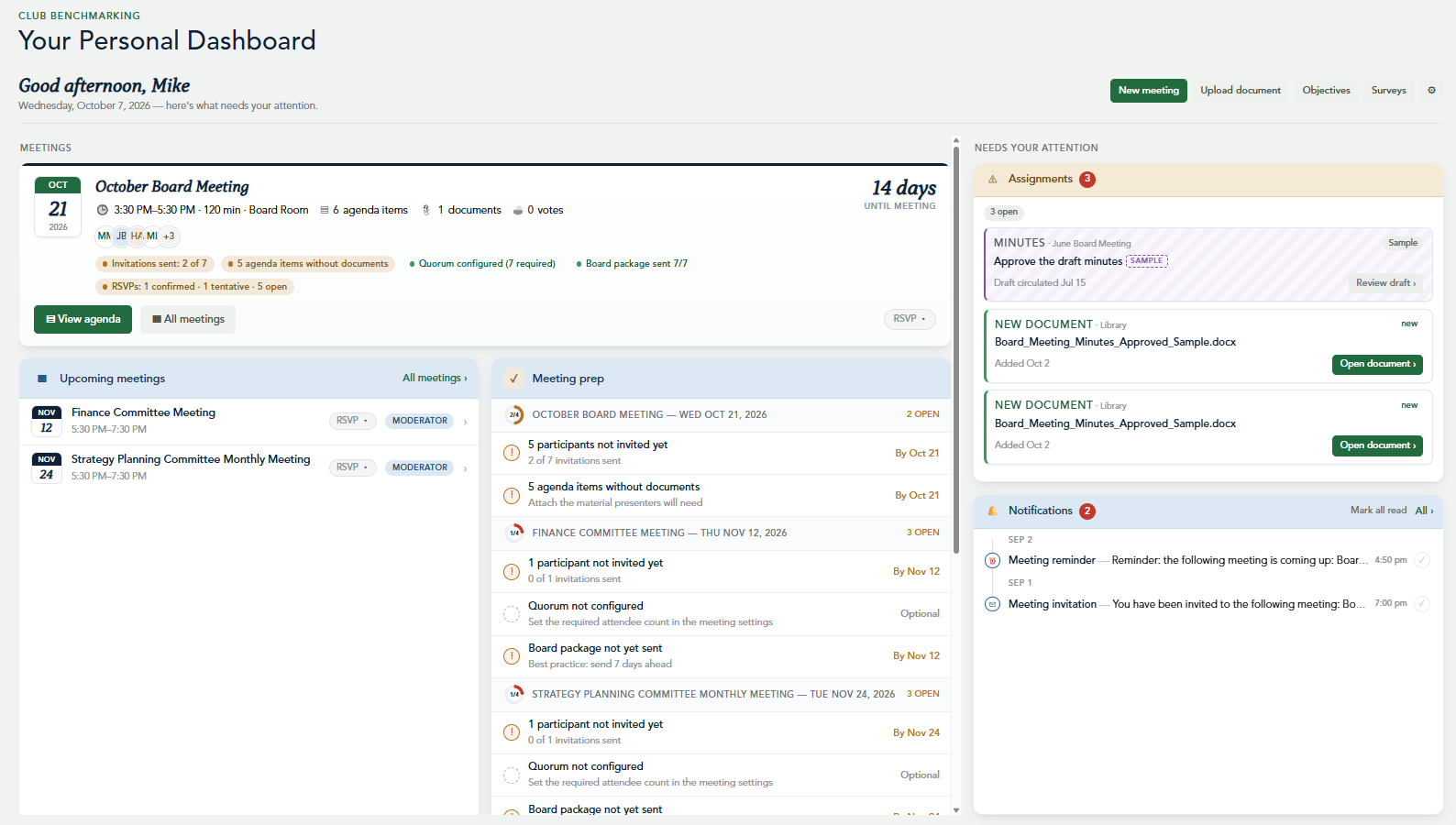
Most board tools are filing cabinets: you have to go looking. The Club Benchmarking Board Portal opens on an action-oriented dashboard built around your role, so every board member, committee chair, and general manager sees what’s coming up and what’s waiting on them the moment they sign in.
Upcoming meeting reminders
A countdown to your next board or committee meeting with date, time, location, agenda items, and documents, plus every other meeting you’re invited to. Each meeting has its own calendar feed that shows up in Outlook, Google, or Apple Calendar.
RSVPs and quorum at a glance
See who has confirmed, who is tentative, and who hasn’t answered, and whether quorum is set and on track, days before the meeting rather than at roll call.
Meeting prep checklist
The Meeting Prep panel flags what’s still outstanding across every upcoming meeting: participants not yet invited, agenda items missing documents, quorum not configured, and board packages not yet sent.
Needs your attention
Pending approvals, assignments with due dates, newly posted documents, and notifications in one feed. Follow-ups assigned in a meeting land here with a deadline, so accountability lives in front of the owner, not in someone’s notes.
Objectives tracking
A progress ring with on-track and delayed status across every scheduled objective keeps the club’s strategic priorities in view between meetings, not just at the annual retreat.
Survey results
Viewpoints member, team member, and board survey results are one click away in the same login, so what members are telling you is part of every governance conversation. About Viewpoints
Meeting management
From agenda to approved minutes, without the scramble
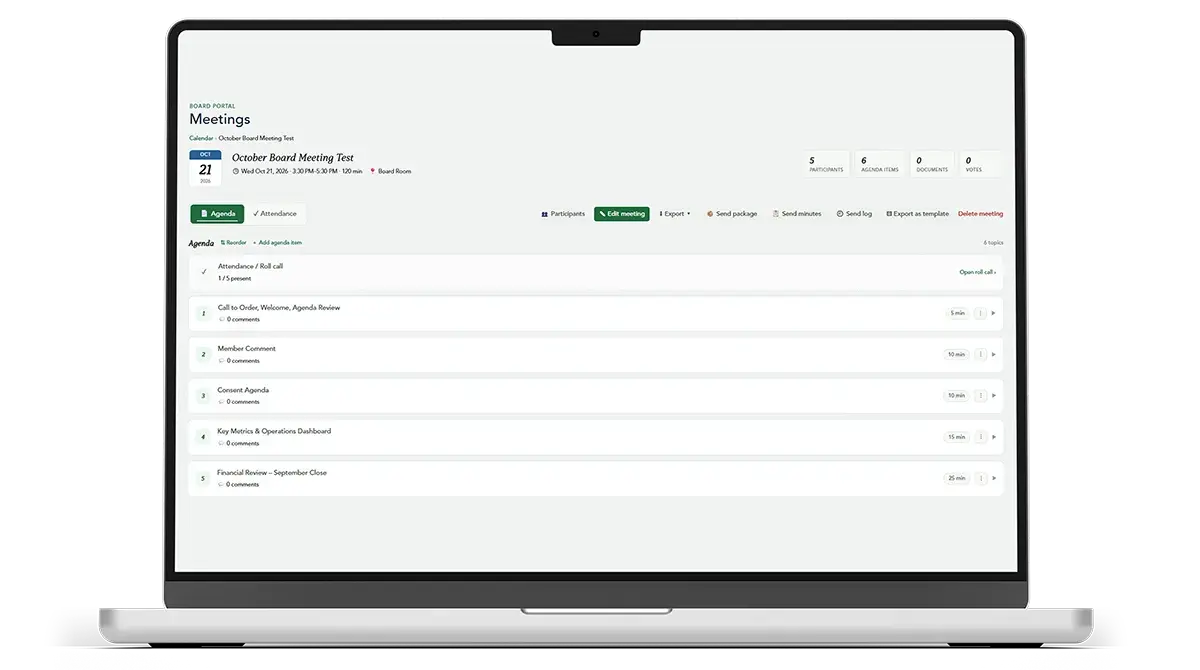
Build the agenda once, attach each document to the item it supports, and send the full board packet in one click. When members open the meeting, every file sits next to its agenda item. No hunting through email, no version confusion, and access tracking shows who read the packet before walking into the room.
Inside the Board Portal
Board governance software designed around how clubs actually work
Everything a club board and its committees need, in one secure, permission-controlled place.
Secure document library
Bylaws, policies, charters, board packets, minutes, financials, and election documents, organized in folders with drag-and-drop upload. Search finds documents by their contents, not just file names, and every folder can be restricted to a role, committee, or group.
Voting and polling
Public or secret ballots, opened during a meeting or on their own. Approve a minor contract or ratify an appointment without calling a meeting. Results are time-stamped, recorded with mover and seconder, and archived to the agenda item.
Action items and follow-ups
Assign a follow-up on any agenda item with an owner and a due date. It appears on that person’s dashboard immediately, so nothing decided in the boardroom gets lost on the way out the door.
Committee Portal
Each committee gets its own meetings, library, objectives, and notifications, mirroring the Board Portal and isolated from other committees. Chairs run agendas, votes, and minutes exactly the way the board does.
Objectives and projects
Club goals, strategic objectives, and board objectives for every committee and department, each tracked by percent complete, red, yellow, or green status, and an assigned owner. Start from pre-built templates or bring in your existing plan.
Club Resources
Club Benchmarking research reports, white papers, board education materials, and user guides for GMs, board members, and committee members, available inside the portal to shorten every new director’s learning curve.
Why clubs choose the Board Portal
Governance that outlasts every transition
Club boards turn over every few years. When meetings, documents, votes, and progress live in one system instead of in one person’s inbox, each new board picks up where the last one left off.
On its own or with Summit
The Board Portal is available on its own, and it is also part of Summit, Club Benchmarking’s club operating system. With Summit, governance sits next to Navigator benchmarking data, the Private Club Balanced Scorecard, and Viewpoints survey results, so board discussions begin with facts. Meet Summit
Continuity built in
Minutes, meeting templates, objectives, and voting history carry forward from one board to the next. When a term ends, users are deactivated rather than deleted, preserving their votes, comments, and access history.
Secure by design
Access is enforced at the system level. Restricted content is inaccessible, not merely hidden, so boards can place sensitive material such as legal correspondence, executive compensation, and member discipline in the portal with confidence.
Getting started
Up and running in your first 30 days
A dedicated onboarding specialist guides your club through setup. Three steps, each building on the last, and your board is working in the portal.
Add your users
Bring in the whole board and every committee from a spreadsheet at once. Credentials go out only when you send them, so nobody gets in before you’re ready.
Upload your foundation
Bylaws, governing policies, and the last 12 months of board minutes. Clubs that seed their history at launch see meaningfully more first-month use.
Send your first package
Finish the agenda for your next real board meeting, attach the documents, preview, and send. That moment is your launch.
Who uses the Board Portal
Built for every seat at the table
Board presidents and directors
Walk into every meeting prepared, vote from any device, and see the club’s objectives move between meetings. Solutions for boards
Committee chairs and members
Your own meetings, library, votes, and objectives, scoped to your committee and run the same way the board runs its business.
General managers and COOs
Spend less time assembling emails and shared-drive files and more time walking in prepared. See every meeting’s readiness across the board and all committees. Solutions for club managers
Executive assistants and board secretaries
Build agendas from templates, send packages in one click, confirm who opened them, and turn live notes into minutes in a fraction of the time.
Common questions
Private club board portals, explained
What is a board portal for a private club?
A board portal is a secure online workspace where a club’s board and committees run meetings, share board packets, vote, record minutes, and track objectives. The Club Benchmarking Board Portal is built specifically for private clubs.
Can we buy the Board Portal on its own?
Yes. The Board Portal is available on its own, and it is also included in Summit, alongside Navigator benchmarking and Viewpoints surveys, all unified by the Private Club Balanced Scorecard. Book a demo to see which option fits your club.
Do board members need to install an app?
No. The Board Portal is web-based and mobile-responsive. Members sign in from any browser on a desktop, tablet, or phone and see a view optimized for their screen and role.
Can committees use the Board Portal?
Yes. The Committee Portal gives each committee its own meetings, library, votes, objectives, and notifications. Committee members see only the committees they belong to.
How is confidential board material protected?
Access is enforced by role and committee at the platform level, and restricted folders are inaccessible to anyone outside the group. Super Users can also see who opened each document.
Can we bring in our existing strategic plan?
Yes. Start from pre-built objective templates, or use the AI-assisted Excel import to map a plan you already keep in a spreadsheet into Objectives and Projects.
Strategic governance begins here
See the dashboard your board will log in to
We’ll walk you through the Board Portal, answer your questions, and show how clubs use it to run better meetings and keep the club’s plan moving from one board to the next.
Book a demo Download the brochure.png?width=194&height=56&name=MicrosoftTeams-image%20(8).png)